

Managing cloud infrastructure through interactive web consoles creates configuration drift, untracked changes, and inconsistent environments across development stages. Adopting Terraform on Azure transforms infrastructure into modular, version-controlled code, allowing platform engineering teams to provision identical virtual networks, compute clusters, and storage tiers reliably across global cloud regions.
By combining HashiCorp Terraform with Azure Resource Manager (ARM) APIs via the azurerm provider, engineering organizations replace manual administrative workflows with repeatable, deterministic Infrastructure as Code (IaC) execution cycles.
Table of Contents
1. Terraform on Azure Architecture Overview
A resilient enterprise deployment cleanly isolates declarative code configurations from runtime state persistence:
- HashiCorp Configuration Language (HCL): The human-readable declarative language used to specify exact cloud topologies, dependencies, and sizing parameters.
- Terraform State Engine (
terraform.tfstate): A single source of truth mapping your declared HCL blocks to concrete Azure resource IDs, subscription endpoints, and metadata attributes. - Remote State Backend (Azure Blob Storage): Stores the production state file centrally with blob lease locking enabled. This prevents race conditions and corrupted states when multiple engineers or CI/CD pipelines run simultaneously.
- Provider Ecosystem (
azurerm): Translates declarative Terraform configuration blocks into direct, authenticated Azure REST API calls.
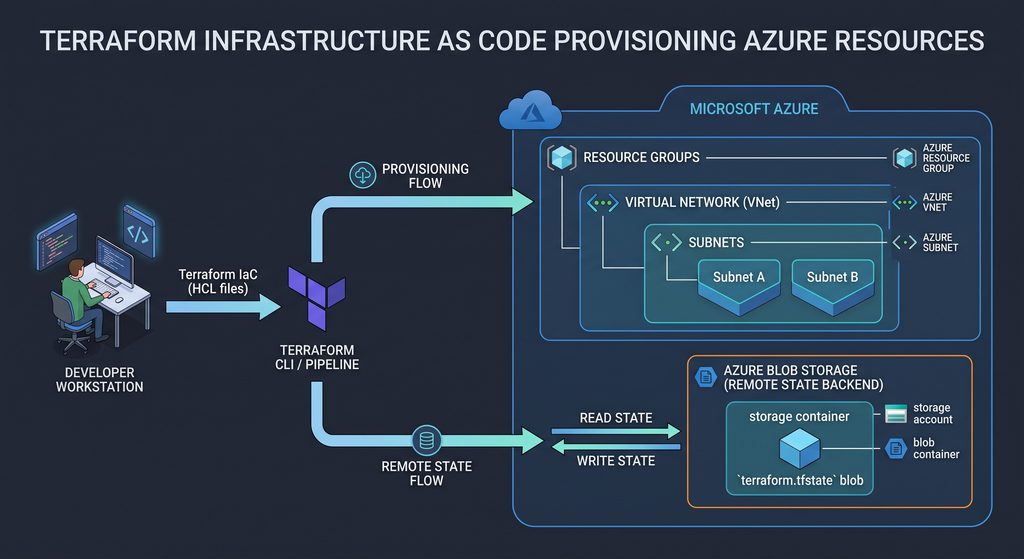
2. Configure Remote State in Azure Blob Storage
Never store production state files locally on a developer workstation. Local state files leak credentials, fail to synchronize across team members, and lack concurrency locks. Managing remote state correctly is the most critical requirement when running Terraform on Azure in production.
Execute these Azure CLI commands to initialize an isolated Resource Group and encrypted Storage Account with blob lease locking:
# Authenticate to your Azure tenant
az login

# Create a dedicated Resource Group for state storage
az group create --name tf-state-rg --location eastus

# Create a globally unique Storage Account with encryption enforced
az storage account create \
  --name devstacktfstate2026 \
  --resource-group tf-state-rg \
  --location eastus \
  --sku Standard_LRS \
  --min-tls-version TLS1_2 \
  --allow-blob-public-access false

# Create the private blob container for state files
az storage container create \
  --name tfstate \
  --account-name devstacktfstate2026 \
  --auth-mode login
3. Enterprise Multi-File Terraform Project Structure
Enterprise-grade Terraform projects avoid massive single-file architectures. You can inspect the complete open-source blueprint and clone the production template directly from our terraform-azure-provisioning-blueprint GitHub Repository. Structure your working directory into modular components for maintainability:
terraform-azure-provisioning-blueprint/
├── .github/
│   └── workflows/
│       └── terraform-ci-cd.yml # Automated linting & schema validation
├── bootstrap/
│   └── setup-remote-state.sh   # Bash utility to bootstrap remote state
├── main.tf                     # Core provider and resource declarations
├── variables.tf                # Input variable types and defaults
├── outputs.tf                  # Exported resource IDs and endpoint values
├── terraform.tfvars.example    # Variable definitions template
└── README.md                   # Repository documentation
Structuring your project cleanly ensures scalable Terraform on Azure implementations across environments.
4. Code Implementation
variables.tf (Dynamic Configurations)
Structuring variables properly allows your Terraform on Azure pipeline to deploy dynamic configurations without code duplication.
variable "environment" {
  type        = string
  description = "Target deployment environment"
  default     = "production"
}

variable "location" {
  type        = string
  description = "Azure region for all provisioned resources"
  default     = "eastus"
}

variable "vnet_address_space" {
  type        = list(string)
  description = "CIDR block for the enterprise virtual network"
  default     = ["10.0.0.0/16"]
}

variable "subnet_prefixes" {
  type        = map(string)
  description = "CIDR allocations for tier-isolated subnets"
  default = {
    web = "10.0.1.0/24"
    app = "10.0.2.0/24"
    db  = "10.0.3.0/24"
  }
}
main.tf (Core Infrastructure Declaration)
This foundational configuration defines how Terraform on Azure manages network security rules and virtual subnets. Declare the provider requirements, remote state backend binding, resource group, virtual network, and Network Security Groups (NSGs):
terraform {
  required_version = ">= 1.7.0"
  required_providers {
    azurerm = {
      source  = "hashicorp/azurerm"
      version = "~> 3.100.0"
    }
  }

  backend "azurerm" {
    resource_group_name  = "tf-state-rg"
    storage_account_name = "devstacktfstate2026"
    container_name       = "tfstate"
    key                  = "production.infrastructure.tfstate"
  }
}

provider "azurerm" {
  features {
    resource_group {
      prevent_deletion_if_contains_resources = true
    }
  }
}

# Core Resource Group
resource "azurerm_resource_group" "infra_rg" {
  name     = "rg-devstack-${var.environment}"
  location = var.location
  tags = {
    Environment = var.environment
    ManagedBy   = "Terraform"
    Project     = "DevStackHub"
  }
}

# Enterprise Virtual Network
resource "azurerm_virtual_network" "core_vnet" {
  name                = "vnet-devstack-${var.environment}"
  address_space       = var.vnet_address_space
  location            = azurerm_resource_group.infra_rg.location
  resource_group_name = azurerm_resource_group.infra_rg.name
}

# Web Tier Subnet
resource "azurerm_subnet" "web_subnet" {
  name                 = "snet-web-${var.environment}"
  resource_group_name  = azurerm_resource_group.infra_rg.name
  virtual_network_name = azurerm_virtual_network.core_vnet.name
  address_prefixes     = [var.subnet_prefixes["web"]]
}

# Network Security Group (NSG) Hardening
resource "azurerm_network_security_group" "web_nsg" {
  name                = "nsg-web-${var.environment}"
  location            = azurerm_resource_group.infra_rg.location
  resource_group_name = azurerm_resource_group.infra_rg.name

  security_rule {
    name                       = "AllowHTTPSInbound"
    priority                   = 100
    direction                  = "Inbound"
    access                     = "Allow"
    protocol                   = "Tcp"
    source_port_range          = "*"
    destination_port_range     = "443"
    source_address_prefix      = "*"
    destination_address_prefix = "*"
  }

  security_rule {
    name                       = "AllowHTTPInbound"
    priority                   = 110
    direction                  = "Inbound"
    access                     = "Allow"
    protocol                   = "Tcp"
    source_port_range          = "*"
    destination_port_range     = "80"
    source_address_prefix      = "*"
    destination_address_prefix = "*"
  }
}

# Subnet-to-NSG Association
resource "azurerm_subnet_network_security_group_association" "web_nsg_assoc" {
  subnet_id                 = azurerm_subnet.web_subnet.id
  network_security_group_id = azurerm_network_security_group.web_nsg.id
}
outputs.tf (Exported Endpoints)
Expose provisioned IDs and CIDR blocks so dependent services and pipelines can consume them without querying the cloud API manually:
output "resource_group_name" {
  description = "The assigned name of the primary resource group"
  value       = azurerm_resource_group.infra_rg.name
}

output "vnet_id" {
  description = "The unique Azure ID of the virtual network"
  value       = azurerm_virtual_network.core_vnet.id
}

output "web_subnet_id" {
  description = "The resource ID of the web tier subnet"
  value       = azurerm_subnet.web_subnet.id
}
5. The 4-Stage Execution Workflow
Every production deployment of Terraform on Azure relies on a standard, predictable four-phase execution cycle.
┌─────────────────────────────────┐
│         terraform init          │
│   (Fetch & Lock Cloud Plugins)  │
└────────────────┬────────────────┘
                 │
                 ▼
┌─────────────────────────────────┐
│         terraform plan          │
│   (Preview Execution Diff)      │
└────────────────┬────────────────┘
                 │
                 ▼
┌─────────────────────────────────┐
│        terraform apply          │
│   (Atomic Cloud Provisioning)   │
└────────────────┬────────────────┘
                 │
                 ▼
┌─────────────────────────────────┐
│        terraform output         │
│   (Export Resource Endpoints)   │
└─────────────────────────────────┘
1. Initialization:
terraform initDownloads the official azurerm provider plugin, validates configuration dependencies, and binds your working environment directly to the encrypted Azure Blob Storage state container. When running static checks on offline systems or lightweight CI pull requests without active Azure credentials, initialize without state binding using “terraform init -backend=false".
2. Static Validation & Linting:
# Check formatting across all files
terraform fmt -check

# Validate configuration syntax against provider schemas
terraform validate
Verifies internal syntax, resource declarations, and schema attributes without contacting cloud APIs. Because this check is entirely declarative, combining it with “terraform init -backend=false“ allows developer machines and pull-request runners to catch configuration syntax errors without needing Azure Service Principal credentials.
3. Deterministic Execution Plan:
terraform plan -out=production.tfplanCompares the live Azure infrastructure against your HCL files and generates an execution diff showing exact additions, modifications, and deletions.
4. Atomic Deployment:
terraform apply production.tfplanExecutes the compiled plan against Azure APIs and records newly minted resource IDs into the remote state blob.
6. Integrating Terraform with Automated CI/CD Pipelines
Running Terraform commands manually from developer machines introduces human variability and security risks. As implemented in our companion repository, you can enforce automated static checks on every push and pull request without exposing cloud credentials to your repository runners. Executing your Terraform on Azure workflows through version-controlled automation prevents drift and unauthorized manual changes.
Here is the exact production workflow (.github/workflows/terraform-ci-cd.yml) running automated formatting checks and schema validation:
name: "Terraform Lint & Validate"

on:
  push:
    branches: [ "main" ]
  pull_request:
    branches: [ "main" ]

jobs:
  validate:
    name: "Terraform Lint & Validate"
    runs-on: ubuntu-latest
    steps:
      - name: Checkout Code Repository
        uses: actions/checkout@v4

      - name: Setup Terraform CLI
        uses: hashicorp/setup-terraform@v3
        with:
          terraform_version: 1.7.5

      - name: Verify Formatting Style
        run: terraform fmt -check

      - name: Initialize Without Backend
        run: terraform init -backend=false

      - name: Validate Syntax & Schemas
        run: terraform validate -no-color
For engineering teams ready to automate cloud state updates directly into live environments on main-branch merges, follow our complete GitHub Actions CI/CD Pipeline Guide and our dedicated walkthrough on Terraform Azure Automation with GitHub Actions.
Once your underlying subnets, security groups, and virtual networks are provisioned, you can package your services into hardened containers using our Production-Ready Docker Containers Guide and host them seamlessly on managed compute with the Azure App Service Deployment Blueprint.
7. Security Best Practices for Enterprise IaC
- Zero Hardcoded Secrets (OIDC & Managed Identity): Avoid using long-lived Azure Service Principal passwords in configuration files or runner secrets. Configure OpenID Connect (OIDC) between your version control system and Azure Active Directory (Microsoft Entra ID) for short-lived, token-based authentication.
- Automated Static Security Scanning: Add tools like
tfsecorcheckovto your pull request pipelines to intercept unencrypted storage buckets, wide-open security rules (0.0.0.0/0), and missing logging configurations before any infrastructure is applied. - Tagging and Cost Allocation: Enforce structured metadata tags (
Environment,CostCenter,ManagedBy) across all resource declarations to track infrastructure costs accurately across business units. - Immutable Infrastructure Cycles: Avoid modifying running cloud resources via the Azure web console. Ensure all modifications flow through git commits, code reviews, and reproducible Terraform on Azure execution plans to maintain environment parity across your entire cloud estate.