

Scaling cloud environments manually via the AWS Management Console introduces configuration drift, opaque security policies, and unrepeatable deployments. Implementing a Terraform AWS production infrastructure provides an immutable, auditable, and modular Infrastructure as Code (IaC) foundation capable of scaling mission-critical services.
This guide details the complete architecture and deployment for an enterprise-ready Terraform AWS production infrastructure. You will build a zero-trust remote state backend with state locking, a highly available multi-AZ VPC, a secure AWS ECS Fargate container cluster, and an automated GitHub Actions deployment pipeline using OpenID Connect (OIDC).
Production Architecture Overview
Reference the official AWS Well-Architected Framework Documentation when designing multi-AZ network isolation. The infrastructure provisioned in this blueprint follows the AWS Well-Architected Framework:
+-----------------------------------+
                           |        Internet Gateway (IGW)     |
                           +-----------------+-----------------+
                                             |
                   +-------------------------+-------------------------+
                   |                                                   |
        +----------v----------+                             +----------v----------+
        | Public Subnet (AZ-A)|                             | Public Subnet (AZ-B)|
        |  [NAT Gateway A]    |                             |  [NAT Gateway B]    |
        |  [Application ALB]  |                             |  [Application ALB]  |
        +----------+----------+                             +----------+----------+
                   |                                                   |
+------------------v---------------------------------------------------v------------------+
| Private Subnets (Workloads)                                                             |
|                                                                                         |
|   +------------------------------------+       +------------------------------------+   |
|   | ECS Task: Web App (AZ-A)           |       | ECS Task: Web App (AZ-B)           |   |
|   | - Non-root container               |       | - Non-root container               |   |
|   | - AWS Systems Manager Logs         |       | - AWS Systems Manager Logs         |   |
|   +-----------------+------------------+       +-----------------+------------------+   |
|                     |                                            |                      |
|                     +--------------------+  +--------------------+                      |
|                                          |  |                                           |
|                               +----------v--v----------+                                |
|                               | AWS Secrets Manager    |                                |
|                               | & KMS Encryption Keys  |                                |
|                               +------------------------+                                |
+-----------------------------------------------------------------------------------------+
Key Architecture Components
Designing an enterprise-grade Terraform AWS production infrastructure requires strict multi-layer separation between state management, networking, compute workloads, and identity federation.
- Remote State Layer: Encrypted Amazon S3 bucket with versioning, public access blocks, and an Amazon DynamoDB state locking table.
- Networking Layer: Dual-AZ Virtual Private Cloud (VPC) with isolated public and private subnets, redundant NAT Gateways, and strict network access control lists (NACLs).
- Compute & Ingress: Application Load Balancer (ALB) terminating HTTPS/HTTP traffic, routing to an AWS ECS Fargate cluster with non-root security contexts.
- Secrets & Security: Principle of least-privilege IAM roles, automated KMS customer-managed key (CMK) rotation, and zero hardcoded cloud credentials via GitHub Actions OIDC.
Project Directory Structure
Organize your Terraform project using a clean, reusable module hierarchy:
terraform-aws-production/
├── .github/
│   └── workflows/
│       └── terraform-pipeline.yml
├── backend-bootstrap/
│   ├── main.tf
│   ├── outputs.tf
│   └── variables.tf
├── environments/
│   └── prod/
│       ├── main.tf
│       ├── outputs.tf
│       ├── terraform.tfvars
│       └── variables.tf
└── modules/
    ├── vpc/
    │   ├── main.tf
    │   ├── outputs.tf
    │   └── variables.tf
    └── ecs-service/
        ├── main.tf
        ├── outputs.tf
        └── variables.tf
Stage 1: Zero-Trust S3 & DynamoDB Remote State Backend
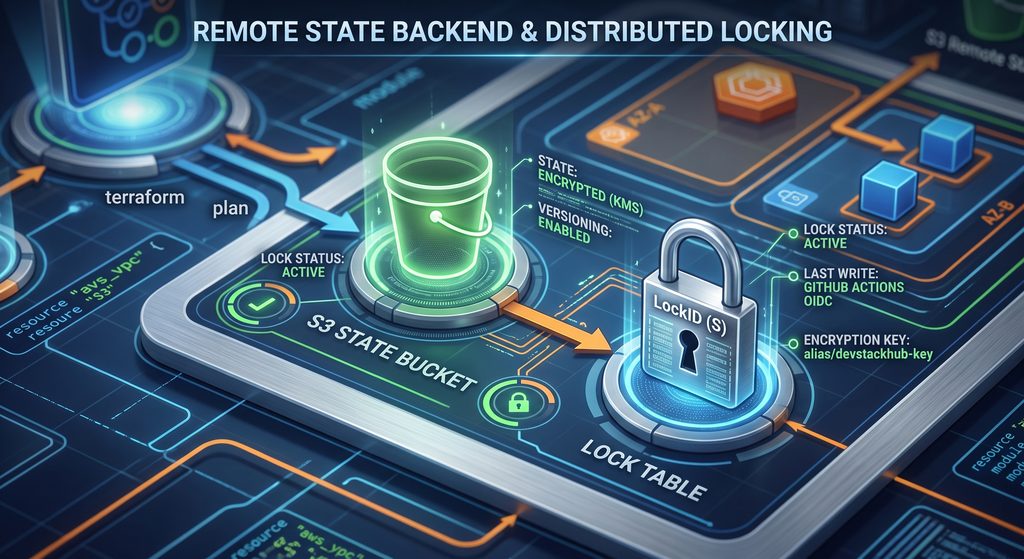
Storing Terraform state locally risks credential leaks, race conditions during collaborative applies, and accidental state corruption.
Create a dedicated bootstrap module to spin up the S3 state backend and DynamoDB lock table before provisioning core infrastructure.
backend-bootstrap/variables.tf
variable "aws_region" {
  type        = string
  description = "The target AWS Region for backend resources."
  default     = "us-east-1"
}

variable "environment" {
  type        = string
  description = "Deployment environment identifier."
  default     = "production"
}

variable "project_name" {
  type        = string
  description = "Project name used for resource naming prefixes."
  default     = "devstackhub"
}
backend-bootstrap/main.tf
terraform {
  required_version = ">= 1.7.0"
  required_providers {
    aws = {
      source  = "hashicorp/aws"
      version = "~> 5.40.0"
    }
  }
}

provider "aws" {
  region = var.aws_region
  default_tags {
    tags = {
      Environment = var.environment
      Project     = var.project_name
      ManagedBy   = "Terraform"
    }
  }
}

# KMS Key for S3 Server-Side Encryption
resource "aws_kms_key" "state_key" {
  description             = "KMS Key for Terraform State Storage"
  deletion_window_in_days = 30
  enable_key_rotation     = true
}

resource "aws_kms_alias" "state_key_alias" {
  name          = "alias/${var.project_name}-terraform-state-key"
  target_key_id = aws_kms_key.state_key.key_id
}

# Secure S3 Bucket for Remote State
resource "aws_s3_bucket" "terraform_state" {
  bucket        = "${var.project_name}-${var.environment}-tfstate-${var.aws_region}"
  force_destroy = false

  lifecycle {
    prevent_destroy = true
  }
}

resource "aws_s3_bucket_versioning" "state_versioning" {
  bucket = aws_s3_bucket.terraform_state.id
  versioning_configuration {
    status = "Enabled"
  }
}

resource "aws_s3_bucket_server_side_encryption_configuration" "state_encryption" {
  bucket = aws_s3_bucket.terraform_state.id

  rule {
    apply_server_side_encryption_by_default {
      kms_master_key_id = aws_kms_key.state_key.arn
      sse_algorithm     = "aws:kms"
    }
  }
}

resource "aws_s3_bucket_public_access_block" "state_enforce_private" {
  bucket = aws_s3_bucket.terraform_state.id

  block_public_acls       = true
  block_public_policy     = true
  ignore_public_acls      = true
  restrict_public_buckets = true
}

# DynamoDB Table for Distributed State Locking
resource "aws_dynamodb_table" "terraform_locks" {
  name         = "${var.project_name}-${var.environment}-tflocks"
  billing_mode = "PAY_PER_REQUEST"
  hash_key     = "LockID"

  attribute {
    name = "LockID"
    type = "S"
  }

  point_in_time_recovery {
    enabled = true
  }

  server_side_encryption {
    enabled     = true
    kms_key_arn = aws_kms_key.state_key.arn
  }
}
backend-bootstrap/outputs.tf
output "state_bucket_name" {
  description = "The S3 bucket name for backend storage."
  value       = aws_s3_bucket.terraform_state.id
}

output "dynamodb_table_name" {
  description = "The DynamoDB table name for state locking."
  value       = aws_dynamodb_table.terraform_locks.name
}

output "kms_key_arn" {
  description = "The ARN of the KMS key securing the state."
  value       = aws_kms_key.state_key.arn
}
Run the bootstrap initialization:
cd backend-bootstrap
terraform init
terraform plan -out=bootstrap.tfplan
terraform apply bootstrap.tfplan
Learn more about configuration options in the official Terraform S3 Backend Documentation.
Stage 2: Production Multi-AZ VPC Network Module
A resilient Terraform AWS production infrastructure isolates compute workloads from the public internet. Public subnets only host ingress load balancers and NAT Gateways, while application tasks run strictly in private subnets. Designing a resilient networking tier is fundamental when deploying a Terraform AWS production infrastructure capable of zero-downtime routing. Isolating database and container instances within private subnets ensures your Terraform AWS production infrastructure maintains strict compliance and boundary defense.
modules/vpc/variables.tf
variable "vpc_cidr" {
  type        = string
  description = "CIDR block for the VPC."
}

variable "environment" {
  type        = string
  description = "Target deployment environment."
}

variable "availability_zones" {
  type        = list(string)
  description = "List of Availability Zones for subnet placement."
}

variable "public_subnet_cidrs" {
  type        = list(string)
  description = "CIDR blocks for public subnets."
}

variable "private_subnet_cidrs" {
  type        = list(string)
  description = "CIDR blocks for private subnets."
}
modules/vpc/main.tf
resource "aws_vpc" "main" {
  cidr_block           = var.vpc_cidr
  enable_dns_support   = true
  enable_dns_hostnames = true

  tags = {
    Name = "${var.environment}-vpc"
  }
}

# Internet Gateway for Inbound/Outbound Public Traffic
resource "aws_internet_gateway" "gw" {
  vpc_id = aws_vpc.main.id

  tags = {
    Name = "${var.environment}-igw"
  }
}

# Public Subnets
resource "aws_subnet" "public" {
  count                   = length(var.public_subnet_cidrs)
  vpc_id                  = aws_vpc.main.id
  cidr_block              = var.public_subnet_cidrs[count.index]
  availability_zone       = var.availability_zones[count.index]
  map_public_ip_on_launch = true

  tags = {
    Name = "${var.environment}-public-subnet-${var.availability_zones[count.index]}"
    Type = "Public"
  }
}

# Private Subnets (Compute and Workloads)
resource "aws_subnet" "private" {
  count                   = length(var.private_subnet_cidrs)
  vpc_id                  = aws_vpc.main.id
  cidr_block              = var.private_subnet_cidrs[count.index]
  availability_zone       = var.availability_zones[count.index]
  map_public_ip_on_launch = false

  tags = {
    Name = "${var.environment}-private-subnet-${var.availability_zones[count.index]}"
    Type = "Private"
  }
}

# Elastic IPs for NAT Gateways
resource "aws_eip" "nat" {
  count  = length(var.public_subnet_cidrs)
  domain = "vpc"

  tags = {
    Name = "${var.environment}-nat-eip-${count.index + 1}"
  }
}

# NAT Gateways for Private Subnet Outbound Internet Access
resource "aws_nat_gateway" "nat" {
  count         = length(var.public_subnet_cidrs)
  allocation_id = aws_eip.nat[count.index].id
  subnet_id     = aws_subnet.public[count.index].id

  tags = {
    Name = "${var.environment}-nat-gw-${count.index + 1}"
  }

  depends_on = [aws_internet_gateway.gw]
}

# Public Route Table
resource "aws_route_table" "public" {
  vpc_id = aws_vpc.main.id

  route {
    cidr_block = "0.0.0.0/0"
    gateway_id = aws_internet_gateway.gw.id
  }

  tags = {
    Name = "${var.environment}-public-rt"
  }
}

resource "aws_route_table_association" "public" {
  count          = length(var.public_subnet_cidrs)
  subnet_id      = aws_subnet.public[count.index].id
  route_table_id = aws_route_table.public.id
}

# Private Route Tables (Pointed to Corresponding NAT Gateways)
resource "aws_route_table" "private" {
  count  = length(var.private_subnet_cidrs)
  vpc_id = aws_vpc.main.id

  route {
    cidr_block     = "0.0.0.0/0"
    nat_gateway_id = aws_nat_gateway.nat[count.index].id
  }

  tags = {
    Name = "${var.environment}-private-rt-${count.index + 1}"
  }
}

resource "aws_route_table_association" "private" {
  count          = length(var.private_subnet_cidrs)
  subnet_id      = aws_subnet.private[count.index].id
  route_table_id = aws_route_table.private[count.index].id
}
modules/vpc/outputs.tf
output "vpc_id" {
  description = "The ID of the provisioned VPC."
  value       = aws_vpc.main.id
}

output "public_subnet_ids" {
  description = "IDs of the public subnets."
  value       = aws_subnet.public[*].id
}

output "private_subnet_ids" {
  description = "IDs of the private subnets."
  value       = aws_subnet.private[*].id
}
Stage 3: Modular ECS Fargate & ALB Workload Configuration
Run stateless application services on AWS ECS Fargate with zero underlying EC2 management overhead. Managing containerized microservices within a Terraform AWS production infrastructure eliminates operational server management while keeping compute costs predictable. Configuring fine-grained security group rules prevents lateral movement across a Terraform AWS production infrastructure.
modules/ecs-service/variables.tf
variable "environment" {
  type        = string
  description = "Deployment environment identifier."
}

variable "vpc_id" {
  type        = string
  description = "VPC ID where the service will run."
}

variable "public_subnet_ids" {
  type        = list(string)
  description = "Public subnets for the Application Load Balancer."
}

variable "private_subnet_ids" {
  type        = list(string)
  description = "Private subnets for ECS task deployment."
}

variable "container_image" {
  type        = string
  description = "Container image URI to deploy."
}

variable "container_port" {
  type        = number
  description = "Port exposed by the container."
  default     = 8080
}

variable "app_count" {
  type        = number
  description = "Desired number of running task instances."
  default     = 2
}
modules/ecs-service/main.tf
# ECS Cluster
resource "aws_ecs_cluster" "main" {
  name = "${var.environment}-cluster"

  setting {
    name  = "containerInsights"
    value = "enabled"
  }
}

# CloudWatch Log Group for Application Output
resource "aws_cloudwatch_log_group" "ecs" {
  name              = "/ecs/${var.environment}-app"
  retention_in_days = 30
}

# IAM Execution Role (Pulls images and writes logs)
resource "aws_iam_role" "ecs_execution_role" {
  name = "${var.environment}-ecs-execution-role"

  assume_role_policy = jsonencode({
    Version = "2012-10-17"
    Statement = [{
      Action    = "sts:AssumeRole"
      Effect    = "Allow"
      Principal = { Service = "ecs-tasks.amazonaws.com" }
    }]
  })
}

resource "aws_iam_role_policy_attachment" "ecs_execution_policy" {
  role       = aws_iam_role.ecs_execution_role.name
  policy_arn = "arn:aws:iam::aws:policy/service-role/AmazonECSTaskExecutionRolePolicy"
}

# IAM Task Role (Permissions for runtime code execution)
resource "aws_iam_role" "ecs_task_role" {
  name = "${var.environment}-ecs-task-role"

  assume_role_policy = jsonencode({
    Version = "2012-10-17"
    Statement = [{
      Action    = "sts:AssumeRole"
      Effect    = "Allow"
      Principal = { Service = "ecs-tasks.amazonaws.com" }
    }]
  })
}

# Security Groups
resource "aws_security_group" "alb" {
  name        = "${var.environment}-alb-sg"
  description = "Controls HTTP/HTTPS access to the ALB"
  vpc_id      = var.vpc_id

  ingress {
    description = "Allow inbound HTTP from internet"
    from_port   = 80
    to_port     = 80
    protocol    = "tcp"
    cidr_blocks = ["0.0.0.0/0"]
  }

  egress {
    description = "Allow all outbound traffic"
    from_port   = 0
    to_port     = 0
    protocol    = "-1"
    cidr_blocks = ["0.0.0.0/0"]
  }
}

resource "aws_security_group" "ecs_tasks" {
  name        = "${var.environment}-ecs-tasks-sg"
  description = "Allows inbound traffic only from the ALB"
  vpc_id      = var.vpc_id

  ingress {
    description     = "Inbound from ALB"
    from_port       = var.container_port
    to_port         = var.container_port
    protocol        = "tcp"
    security_groups = [aws_security_group.alb.id]
  }

  egress {
    description = "Allow all outbound traffic for package/API access"
    from_port   = 0
    to_port     = 0
    protocol    = "-1"
    cidr_blocks = ["0.0.0.0/0"]
  }
}

# Application Load Balancer
resource "aws_lb" "main" {
  name               = "${var.environment}-alb"
  internal           = false
  load_balancer_type = "application"
  security_groups    = [aws_security_group.alb.id]
  subnets            = var.public_subnet_ids

  drop_invalid_header_fields = true
}

resource "aws_lb_target_group" "app" {
  name        = "${var.environment}-tg"
  port        = var.container_port
  protocol    = "HTTP"
  vpc_id      = var.vpc_id
  target_type = "ip"

  health_check {
    healthy_threshold   = 3
    unhealthy_threshold = 3
    timeout             = 5
    interval            = 30
    path                = "/health"
    matcher             = "200"
  }
}

resource "aws_lb_listener" "http" {
  load_balancer_arn = aws_lb.main.arn
  port              = 80
  protocol          = "HTTP"

  default_action {
    type             = "forward"
    target_group_arn = aws_lb_target_group.app.arn
  }
}

# ECS Task Definition
resource "aws_ecs_task_definition" "app" {
  family                   = "${var.environment}-app-task"
  network_mode             = "awsvpc"
  requires_compatibilities = ["FARGATE"]
  cpu                      = "256"
  memory                   = "512"
  execution_role_arn       = aws_iam_role.ecs_execution_role.arn
  task_role_arn            = aws_iam_role.ecs_task_role.arn

  container_definitions = jsonencode([
    {
      name      = "application"
      image     = var.container_image
      essential = true
      portMappings = [
        {
          containerPort = var.container_port
          hostPort      = var.container_port
          protocol      = "tcp"
        }
      ]
      logConfiguration = {
        logDriver = "awslogs"
        options = {
          "awslogs-group"         = aws_cloudwatch_log_group.ecs.name
          "awslogs-region"        = "us-east-1"
          "awslogs-stream-prefix" = "ecs"
        }
      }
      readonlyRootFilesystem = false
      user                   = "10001:10001"
    }
  ])
}

# ECS Service
resource "aws_ecs_service" "main" {
  name            = "${var.environment}-service"
  cluster         = aws_ecs_cluster.main.id
  task_definition = aws_ecs_task_definition.app.arn
  desired_count   = var.app_count
  launch_type     = "FARGATE"

  network_configuration {
    security_groups  = [aws_security_group.ecs_tasks.id]
    subnets          = var.private_subnet_ids
    assign_public_ip = false
  }

  load_balancer {
    target_group_arn = aws_lb_target_group.app.arn
    container_name   = "application"
    container_port   = var.container_port
  }

  deployment_controller {
    type = "ECS"
  }

  depends_on = [aws_lb_listener.http]
}
modules/ecs-service/outputs.tf
output "alb_dns_name" {
  description = "The public DNS name of the Application Load Balancer."
  value       = aws_lb.main.dns_name
}
Stage 4: Production Environment Assembly
Connect your networking and compute modules within the production environment configuration. Assembling individual VPC and compute modules into a unified root directory gives your Terraform AWS production infrastructure reproducible multi-environment consistency.
environments/prod/main.tf
terraform {
  required_version = ">= 1.7.0"

  required_providers {
    aws = {
      source  = "hashicorp/aws"
      version = "~> 5.40.0"
    }
  }

  backend "s3" {
    bucket         = "devstackhub-production-tfstate-us-east-1"
    key            = "production/terraform.tfstate"
    region         = "us-east-1"
    dynamodb_table = "devstackhub-production-tflocks"
    encrypt        = true
  }
}

provider "aws" {
  region = var.aws_region

  default_tags {
    tags = {
      Environment = "Production"
      ManagedBy   = "Terraform"
      Repository  = "infrastructure-live"
    }
  }
}

module "vpc" {
  source = "../../modules/vpc"

  environment          = "production"
  vpc_cidr             = var.vpc_cidr
  availability_zones   = var.availability_zones
  public_subnet_cidrs  = var.public_subnet_cidrs
  private_subnet_cidrs = var.private_subnet_cidrs
}

module "ecs_service" {
  source = "../../modules/ecs-service"

  environment        = "production"
  vpc_id             = module.vpc.vpc_id
  public_subnet_ids  = module.vpc.public_subnet_ids
  private_subnet_ids = module.vpc.private_subnet_ids
  container_image    = var.container_image
  container_port     = 8080
  app_count          = 3
}
environments/prod/variables.tf
variable "aws_region" {
  type        = string
  default     = "us-east-1"
}

variable "vpc_cidr" {
  type        = string
  default     = "10.0.0.0/16"
}

variable "availability_zones" {
  type        = list(string)
  default     = ["us-east-1a", "us-east-1b"]
}

variable "public_subnet_cidrs" {
  type        = list(string)
  default     = ["10.0.1.0/24", "10.0.2.0/24"]
}

variable "private_subnet_cidrs" {
  type        = list(string)
  default     = ["10.0.10.0/24", "10.0.20.0/24"]
}

variable "container_image" {
  type        = string
  description = "Target production Docker image"
  default     = "nginx:alpine"
}
environments/prod/outputs.tf
output "production_alb_endpoint" {
  description = "Load balancer public URL"
  value       = "http://${module.ecs_service.alb_dns_name}"
}
Stage 5: GitHub Actions CI/CD Pipeline with AWS OIDC
Never store static AWS_ACCESS_KEY_ID and AWS_SECRET_ACCESS_KEY credentials in your CI/CD repository secrets. Instead, configure AWS IAM OpenID Connect (OIDC) identity federation so GitHub Actions can assume a short-lived IAM deployment role directly. Triggering automated workflows keeps the Terraform AWS production infrastructure consistent across all regions while eliminating manual deployment errors. Follow standard authentication guidelines outlined in the AWS OpenID Connect (OIDC) GitHub Actions Guide. Automating your deployment pipeline with role assumption is the safest way to maintain a Terraform AWS production infrastructure without managing static credentials.
.github/workflows/terraform-pipeline.yml
name: Terraform AWS Production Pipeline

on:
  push:
    branches: [ main ]
    paths:
      - 'environments/prod/**'
      - 'modules/**'
  pull_request:
    branches: [ main ]
    paths:
      - 'environments/prod/**'
      - 'modules/**'

permissions:
  id-token: write   # Required for requesting short-lived AWS STS tokens
  contents: read    # Required to checkout the repository
  pull-requests: write # Required for PR commenting

jobs:
  validate:
    name: Terraform Format & Static Lint
    runs-on: ubuntu-latest
    steps:
      - name: Checkout Code
        uses: actions/checkout@v4

      - name: Setup Terraform
        uses: hashicorp/setup-terraform@v3
        with:
          terraform_version: 1.7.5

      - name: Check Terraform Format
        run: terraform fmt -check -recursive

  plan:
    name: Terraform Plan & Security Audit
    needs: validate
    runs-on: ubuntu-latest
    steps:
      - name: Checkout Code
        uses: actions/checkout@v4

      - name: Configure AWS Credentials via OIDC
        uses: aws-actions/configure-aws-credentials@v4
        with:
          role-to-assume: arn:aws:iam::123456789012:role/github-actions-terraform-prod-role
          aws-region: us-east-1

      - name: Setup Terraform
        uses: hashicorp/setup-terraform@v3
        with:
          terraform_version: 1.7.5

      - name: Terraform Init
        working-directory: environments/prod
        run: terraform init

      - name: Terraform Plan
        id: plan
        working-directory: environments/prod
        run: terraform plan -no-color -out=tfplan

      - name: Security Scan with Tfsec
        uses: aquasecurity/tfsec-action@v1.0.3
        with:
          working_directory: environments/prod

  apply:
    name: Terraform Apply (Production)
    needs: plan
    if: github.ref == 'refs/heads/main' && github.event_name == 'push'
    runs-on: ubuntu-latest
    steps:
      - name: Checkout Code
        uses: actions/checkout@v4

      - name: Configure AWS Credentials via OIDC
        uses: aws-actions/configure-aws-credentials@v4
        with:
          role-to-assume: arn:aws:iam::123456789012:role/github-actions-terraform-prod-role
          aws-region: us-east-1

      - name: Setup Terraform
        uses: hashicorp/setup-terraform@v3
        with:
          terraform_version: 1.7.5

      - name: Terraform Init
        working-directory: environments/prod
        run: terraform init

      - name: Terraform Apply
        working-directory: environments/prod
        run: terraform apply -auto-approve
Production Security and Verification Checklist
| Security Area | Control Item | Target Status |
| State Storage | S3 Bucket Public Access | Fully Blocked (block_public_acls = true) |
| Data At Rest | S3 State File Encryption | Customer-Managed AWS KMS Key (aws:kms) |
| State Locking | Race Condition Prevention | DynamoDB Table Partition Key LockID |
| Networking | Workload Subnet Isolation | Zero public IPs assigned to ECS Task ENIs |
| Ingress | Traffic Route Enforcement | ALB Ingress on 80/443; Tasks ingress exclusively from ALB SG |
| Identity | CI/CD Secrets Elimination | AWS OIDC Federated Role with short-lived STS tokens |
Frequently Asked Questions (FAQs)
Why should I choose DynamoDB state locking over standard S3 versioning?
S3 versioning provides recovery capabilities when files are overwritten, but it does not prevent simultaneous terraform apply executions. DynamoDB maintains a real-time mutual exclusion lock on the state file, throwing an immediate error if another engineer or pipeline attempts a deployment at the same time. Implementing DynamoDB state locking protects a Terraform AWS production infrastructure from accidental race conditions and corrupted state files during simultaneous pipeline runs.
How do I handle circular dependencies between the state backend and the VPC?
Never create the remote state backend inside the same root module as your application workloads. Use the two-step approach demonstrated in this guide: first deploy the isolated backend-bootstrap using local state, then reference that established S3 bucket and DynamoDB table in the backend "s3" block of your core infrastructure.
What is the recommended way to rotate secrets without plain-text exposure in .tfvars?
Store runtime credentials directly in AWS Secrets Manager or AWS Systems Manager Parameter Store. Reference their dynamic ARNs in your Terraform task definitions via the secrets attribute rather than passing plain-text strings through variable files.
A structured Terraform AWS production infrastructure eliminates operational drift and provides an automated, immutable foundation for cloud workloads. By combining state locking, isolated network tiers, and OIDC CI/CD pipelines, your team can deploy infrastructure updates safely and reliably.
Summary & Best Practices
Building an enterprise-ready infrastructure footprint requires strict adherence to immutability, least privilege, and automated validation:
- State Isolation: Never co-locate remote state bootstrap resources within the same state file as the infrastructure they track.
- Network Segregation: Keep application containers strictly inside private subnets without public IPs, allowing inbound access exclusively through the load balancer’s security group.
- Zero Static Keys: Federate GitHub Actions using AWS IAM OpenID Connect (OIDC) to eliminate long-lived cloud credentials from your CI/CD repository secrets.
- Continuous Linting & Scanning: Run automated formatting checks (
terraform fmt), security audits (tfsec), and state-locking validations on every pull request prior to merge.
Following these practices ensures your production environment remains secure, cost-effective, and fully resilient against configuration drift. Maintaining an immutable Terraform AWS production infrastructure gives engineering teams the speed and confidence needed to deploy scalable cloud services.
Related DevOps & Cloud Architecture Guides
Expand your automation and container orchestration pipelines with our deep-dive implementation blueprints:
- Production-Ready GitHub Actions CI/CD Pipeline: Implement matrix testing, multi-stage Docker builds, and zero-downtime container deployments.
- Kubernetes vs Docker Swarm: Production Comparison & Hybrid Architecture: Evaluate cluster overhead, ingress routing, stateful workloads, and day-two operations.