

Managing serverless container fleets in a production environment requires a highly automated, tamper-proof delivery pipeline. Manually updating container image tags, pushing artifacts from local machines, and restarting services through the AWS Management Console introduces severe operational bottlenecks, configuration drift, and unavoidable human error.
Setting up AWS ECS GitHub Actions continuous delivery pipelines automates the entire journey from a git commit to an active rolling deployment on AWS ECS Fargate without risking downtime. By standardizing deployments using modern OpenID Connect (OIDC) authentication, engineering teams eliminate long-lived cloud credentials while ensuring every code push to the main branch is compiled, validated, digitally signed, and deployed reliably.
This master guide breaks down exactly how to construct an enterprise-grade CI/CD pipeline for AWS ECS, complete with secure authentication, immutable container registries, and automated rollback protections.
1. Architectural Deep Dive: The AWS ECS GitHub Actions Deployment Flow
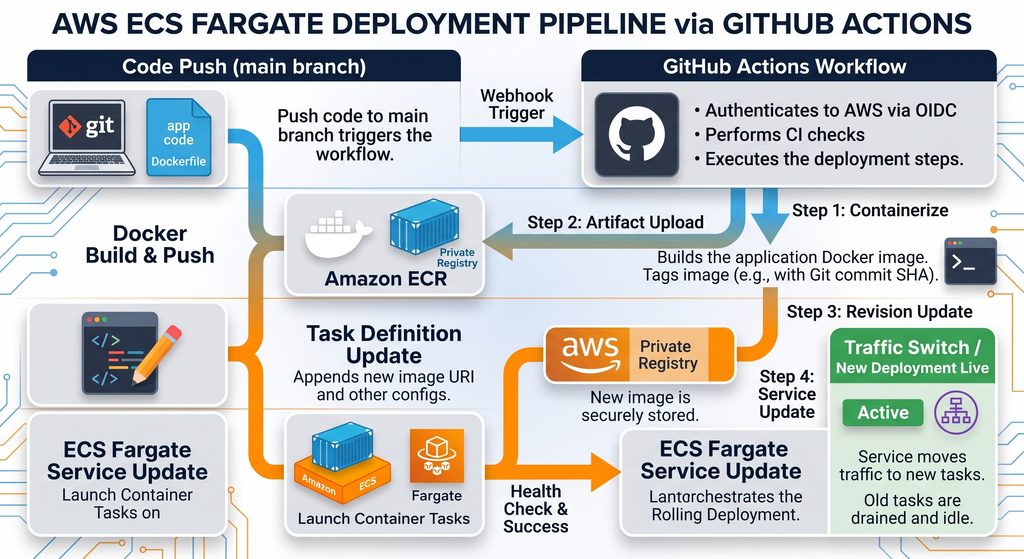
An enterprise-grade AWS ECS GitHub Actions continuous deployment pipeline strictly decouples source control triggers from container runtime execution. Rather than providing long-lived administrative credentials (which can be leaked or stolen) to CI runners, the workflow authenticates dynamically against AWS Identity and Access Management (IAM) through OIDC token exchange.
The end-to-end delivery cycle consists of four primary operational stages:
- OpenID Connect (OIDC) Identity Broker: GitHub Actions requests a short-lived JSON Web Token (JWT) directly from GitHub’s OIDC provider. AWS Security Token Service (STS) verifies this token and exchanges it for temporary IAM session credentials.
- Amazon Elastic Container Registry (ECR): Serving as the immutable container registry, ECR stores versioned Docker images. Instead of overwriting a generic
latesttag, each image is tagged with its unique git commit SHA hash. - Task Definition Interpolation: The deployment runner pulls your base ECS task definition JSON, replaces the old container image URI with the newly pushed SHA-tagged digest, and registers a brand-new revision with the AWS API.
- Amazon ECS Fargate Rolling Deployment: ECS orchestrates zero-downtime task replacement by launching new container tasks alongside the old ones, verifying target group health check endpoints, and safely draining traffic from obsolete tasks.
2. Prerequisites and Infrastructure Dependencies
Before setting up the automated delivery pipeline, your foundational cloud infrastructure and compute clusters must be active. If you have not yet provisioned your networking topology, configure your core VPC, private subnets, NAT Gateways, and ECS cluster using our Terraform AWS Production Infrastructure Blueprint.
Ensure the following resources exist in your AWS account:
- ECS Cluster & Fargate Service: An active ECS cluster with an associated ECS Service explicitly configured for
FARGATEcapacity providers or launch types. - Amazon ECR Repository: A private repository named to reflect your microservice (e.g.,
devstack-api). - Application Load Balancer (ALB): Configured with target group health checks pointing to your container’s HTTP ports. The ALB is critical for achieving true zero-downtime rollouts.
3. Step 1: Configure Secure OIDC Authentication (No Static AWS Keys)
Storing static AWS_ACCESS_KEY_ID and AWS_SECRET_ACCESS_KEY strings inside GitHub Secrets poses a significant security liability. If those keys are leaked or accidentally printed in logs, they grant persistent access to your cloud account until manually revoked. OpenID Connect (OIDC) completely replaces static secrets with short-lived, verifiable IAM role assumptions. Configuring role federation ensures your AWS ECS GitHub Actions workflow receives short-lived credentials without exposing persistent secrets.
Create the GitHub OIDC Identity Provider in AWS IAM
If your AWS account does not already have a GitHub Actions identity provider registered, create it using the AWS CLI. This tells AWS to trust tokens cryptographically signed by GitHub:
aws iam create-open-id-connect-provider \
  --url "https://token.actions.githubusercontent.com" \
  --client-id-list "sts.amazonaws.com" \
  --thumbprint-list "6938fd4d98bab03faadb97b34396831e3780aea1"
Define the IAM Trust Policy (github-oidc-role.json)
You must restrict role assumption exclusively to your specific repository and branch. If you leave the StringLike condition too broad, any GitHub repository on the internet could assume your AWS role. Replace YOUR_GITHUB_ORG_OR_USERNAME and YOUR_REPO_NAME with your actual repository values:
{
  "Version": "2012-10-17",
  "Statement": [
    {
      "Effect": "Allow",
      "Principal": {
        "Federated": "arn:aws:iam::ACCOUNT_ID:oidc-provider/token.actions.githubusercontent.com"
      },
      "Action": "sts:AssumeRoleWithWebIdentity",
      "Condition": {
        "StringEquals": {
          "token.actions.githubusercontent.com:aud": "sts.amazonaws.com"
        },
        "StringLike": {
          "token.actions.githubusercontent.com:sub": "repo:YOUR_GITHUB_ORG_OR_USERNAME/YOUR_REPO_NAME:ref:refs/heads/main"
        }
      }
    }
  ]
}
Create the IAM role and attach standard permission policies allowing the runner to authenticate with ECR, register ECS task definitions, and update your target ECS service:
# Create the IAM Role for GitHub Actions
aws iam create-role \
  --role-name GitHubActions-ECR-ECS-DeployRole \
  --assume-role-policy-document file://github-oidc-role.json

# Attach necessary deployment policies (Apply least-privilege in production)
aws iam attach-role-policy \
  --role-name GitHubActions-ECR-ECS-DeployRole \
  --policy-arn arn:aws:iam::aws:policy/AmazonEC2ContainerRegistryPowerUser

aws iam attach-role-policy \
  --role-name GitHubActions-ECR-ECS-DeployRole \
  --policy-arn arn:aws:iam::aws:policy/AmazonECS_FullAccess
4. Step 2: Prepare the Container Task Definition Template
Amazon ECS Task Definitions act as the blueprint for your application containers. They define CPU allocation, memory ceilings, environment variables, logging configurations, and network settings.
Instead of managing the task definition purely in the AWS Console, it is highly recommended to treat it as “Infrastructure as Code” by checking it into your GitHub repository as a JSON file.
Export your existing task definition from your cloud console or save this base blueprint inside your repository root as .aws/task-definition.json:
{
  "family": "devstack-production-task",
  "networkMode": "awsvpc",
  "requiresCompatibilities": ["FARGATE"],
  "cpu": "256",
  "memory": "512",
  "executionRoleArn": "arn:aws:iam::ACCOUNT_ID:role/ecsTaskExecutionRole",
  "taskRoleArn": "arn:aws:iam::ACCOUNT_ID:role/ecsTaskRole",
  "containerDefinitions": [
    {
      "name": "devstack-api-container",
      "image": "ACCOUNT_ID.dkr.ecr.us-east-1.amazonaws.com/devstack-api:latest",
      "essential": true,
      "portMappings": [
        {
          "containerPort": 8080,
          "hostPort": 8080,
          "protocol": "tcp"
        }
      ],
      "logConfiguration": {
        "logDriver": "awslogs",
        "options": {
          "awslogs-group": "/ecs/devstack-api",
          "awslogs-region": "us-east-1",
          "awslogs-stream-prefix": "ecs"
        }
      }
    }
  ]
}
Understanding the Roles:
- Execution Role (
executionRoleArn): The permission AWS needs to pull the image from ECR and send logs to CloudWatch. - Task Role (
taskRoleArn): The permission your actual running application uses to access other AWS services (like S3 buckets or DynamoDB tables).
Prior to running automated delivery in production, ensure your underlying Docker image is optimized for production workloads by reviewing our Production-Ready Docker Containers Guide.
5. Step 3: Implement the GitHub Actions CI/CD Workflow (Line-by-Line Breakdown)
Create your AWS ECS GitHub Actions workflow file inside .github/workflows/deploy-ecs.yml. This pipeline automates the entire delivery chain using AWS ECS GitHub Actions best practices: establishing OIDC authorization, building the Docker image, pushing the artifact to Amazon ECR, and initiating rolling task updates across ECS Fargate
name: "Deploy to Amazon ECS"

on:
  push:
    branches:
      - main

permissions:
  id-token: write   # CRITICAL: Required for requesting the OIDC JWT token
  contents: read    # Required to checkout the source repository code

env:
  AWS_REGION: "us-east-1"
  ROLE_TO_ASSUME: "arn:aws:iam::ACCOUNT_ID:role/GitHubActions-ECR-ECS-DeployRole"
  ECR_REPOSITORY: "devstack-api"
  ECS_SERVICE: "devstack-production-service"
  ECS_CLUSTER: "devstack-production-cluster"
  ECS_TASK_DEFINITION: ".aws/task-definition.json"
  CONTAINER_NAME: "devstack-api-container"

jobs:
  deploy:
    name: "Build, Package & Deploy"
    runs-on: ubuntu-latest

    steps:
      - name: Checkout Source Code
        uses: actions/checkout@v4

      # 1. Authenticate with AWS using OIDC
      - name: Configure AWS Credentials via OIDC
        uses: aws-actions/configure-aws-credentials@v4
        with:
          role-to-assume: ${{ env.ROLE_TO_ASSUME }}
          aws-region: ${{ env.AWS_REGION }}
          audience: "sts.amazonaws.com"

      # 2. Login to ECR Registry
      - name: Log in to Amazon ECR
        id: login-ecr
        uses: aws-actions/amazon-ecr-login@v2

      # 3. Build Container and tag with Git SHA
      - name: Build, Tag, and Push Container Image to ECR
        id: build-image
        env:
          ECR_REGISTRY: ${{ steps.login-ecr.outputs.registry }}
          IMAGE_TAG: ${{ github.sha }}
        run: |
          docker build -t $ECR_REGISTRY/$ECR_REPOSITORY:$IMAGE_TAG -t $ECR_REGISTRY/$ECR_REPOSITORY:latest .
          docker push $ECR_REGISTRY/$ECR_REPOSITORY:$IMAGE_TAG
          docker push $ECR_REGISTRY/$ECR_REPOSITORY:latest
          echo "image=$ECR_REGISTRY/$ECR_REPOSITORY:$IMAGE_TAG" >> $GITHUB_OUTPUT

      # 4. Update the Task Definition with the new Image URI
      - name: Render New Image in Task Definition
        id: render-task-def
        uses: aws-actions/amazon-ecs-render-task-definition@v1
        with:
          task-definition: ${{ env.ECS_TASK_DEFINITION }}
          container-name: ${{ env.CONTAINER_NAME }}
          image: ${{ steps.build-image.outputs.image }}

      # 5. Deploy the updated Task Definition to the ECS Service
      - name: Deploy Amazon ECS Task Definition
        uses: aws-actions/amazon-ecs-deploy-task-definition@v2
        with:
          task-definition: ${{ steps.render-task-def.outputs.task-definition }}
          service: ${{ env.ECS_SERVICE }}
          cluster: ${{ env.ECS_CLUSTER }}
          wait-for-service-stability: true
For teams looking to refine their CI pipeline performance, apply workflow caching strategies from our GitHub Actions CI/CD Pipeline Guide.
If your organization runs workloads across multiple cloud ecosystems, you can contrast this pipeline against our walkthrough on Terraform Azure Automation with GitHub Actions.
6. Step 4: Validate Zero-Downtime Rolling Updates & Circuit Breakers
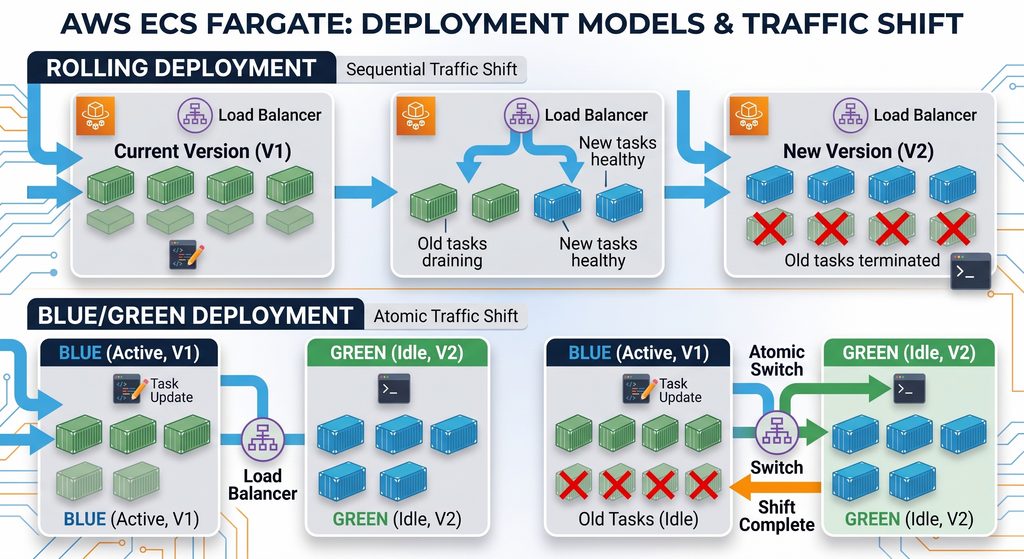
When the aws-actions/amazon-ecs-deploy-task-definition@v2 action triggers, it monitors the ECS API until the deployment completes. Setting wait-for-service-stability: true ensures the GitHub Actions runner does not terminate until the deployment succeeds or safely rolls back.
The Deployment Verification Cycle:
- Parallel Task Scheduling: ECS provisions the new task revision alongside your existing running containers.
- ALB Registration & Health Verification: The Application Load Balancer issues synthetic HTTP health check probes against the new container’s exposed port.
- Connection Draining: Once the new task is marked healthy, the ALB diverts incoming traffic away from legacy tasks and allows in-flight HTTP requests to finish cleanly.
- Graceful Decommissioning: Obsolete tasks receive a
SIGTERMsignal, run their shutdown routines, and terminate without dropping user sessions.
Enabling ECS Deployment Circuit Breakers
To prevent the pipeline from hanging endlessly if an application crashes on boot (e.g., due to a missing environment variable or database connection error), enable Deployment Circuit Breakers on your ECS Service. If the new containers repeatedly fail their health checks, the circuit breaker automatically halts the deployment, shifts all traffic back to the previous stable revision, and marks the GitHub Action as failed.
7. Step 5: Advanced Troubleshooting Guide
Even the most robust AWS ECS GitHub Actions pipelines encounter occasional configuration hurdles. Here are the most common deployment failures and how to resolve them:
- OIDC Token Mismatch (
NotAuthorizedException): If theconfigure-aws-credentialsstep fails, verify that your GitHub repository name exactly matches theStringLikecondition in the IAM Trust Policy. Ensure you are pushing to themainbranch, as the policy strictly limits access torefs/heads/main. - ECR Push Denied: Ensure the IAM role assigned to the GitHub Action has the
AmazonEC2ContainerRegistryPowerUserpolicy attached, which is required to upload new layers. - Task Definition Rendering Errors: If the
render-task-definitionstep fails to find your container, ensure theCONTAINER_NAMEenvironment variable in your YAML exactly matches the"name"property inside your.aws/task-definition.jsonfile. - Service Stability Timeout: If the deployment hangs and eventually times out, your new container is likely crashing on startup. Check the Amazon CloudWatch logs for your ECS service to identify application-level crashes (like a fatal Node.js or Python traceback).
8. Enterprise Best Practices for AWS ECS CI/CD
To mature your AWS ECS GitHub Actions deployment pipeline beyond the basics, implement these production-ready practices:
- Enforce Immutability with Git SHA Image Tags: Avoid deploying containers tagged solely with
:latest. Using${{ github.sha }}binds every running container to an exact commit in your git history, making forensic audits and version rollbacks instantaneous. - Integrate Container Vulnerability Scanning: Activate Amazon ECR continuous scanning or integrate image vulnerability tools (like Trivy) directly into your pull-request pipeline to intercept high-severity CVE vulnerabilities before deployment.
- Strict Least-Privilege Role Boundaries: Maintain separate IAM roles for task execution (
executionRoleArn) and runtime service permissions (taskRoleArn). Furthermore, tighten the GitHub Actions runner role so it can update only the designated staging and production ECS services, rather than possessing blanketAmazonECS_FullAccess. - Enable ECS-Managed Tags: When using the deployment action, set
enable-ecs-managed-tags: trueto automatically append cluster and service tracking metadata to your running tasks, significantly simplifying AWS cost-allocation reports and billing analysis.